
JavaScript language features: assignment, shallow copy, and deep copy
Preface
Recently I’ve been solving algorithm problems on LeetCode with JavaScript. One day, while working on a problem, I found that my logic seemed correct, but the output was always a bit strange. For example, with the following code:
/**
 * @param {number[]} nums1
 * @param {number} m
 * @param {number[]} nums2
 * @param {number} n
 * @return {void} Do not return anything, modify nums1 in-place instead.
 */
var merge = function(nums1, m, nums2, n) {
    if(m === 0) {
        nums1 = nums2
        return
    }
}
It looks fine, but the actual output is:
**Input**
nums1 = [0]
m = 0
nums2 = [1]
n = 1
**Output** [0]
**Expected** [1]
It seems that nums1 = nums2 did not fully assign the content of nums2 into the corresponding location of nums1. So when the judge checks the value at the original address of nums1, the output differs from the expected result.
This involves JavaScript’s assignment rules. Suppose there are two variables nums1 and nums2.
If nums2 is a primitive type (number, string, boolean, null, or undefined), then executing nums1 = nums2 gives nums1 a copy of nums2. They are independent: changing one won’t affect the other.
But if nums2 is a reference type (array, object, function, etc.), then executing nums1 = nums2 does not create a copy. Instead, nums1 gets a reference to the same memory address that nums2 points to. That means nums1 and nums2 now point to the same array in memory. If you modify the array via nums1, it affects nums2. Meanwhile, the original array that nums1 used to point to becomes unreachable if there are no other references.
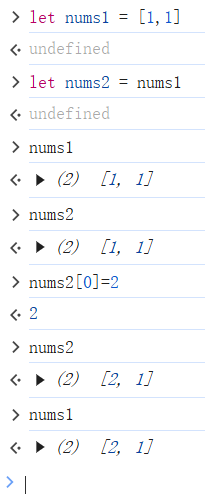
To solve this, JavaScript developers came up with two ways to copy variables: shallow copy and deep copy. These methods aim to build an exact 1:1 duplicate of a variable, rather than using assignment that makes two variables point to the same address—so the original and its copy don’t affect each other.
What Is a Shallow Copy?
Let’s look at these two variables:
let x = {
    id: 1,
    name: 'test1',
    isObject: true
}
let y = {
    id: 2,
    name: 'test2',
    isObject: true,
    parent: {
        id: 1,
        name: 'test1',
        isObject: true
    },
    greet: function() {
        console.log(`Hello, my name is ${this.name}.`);
    }
}
x is an object whose property values are all primitives, while y is an object whose property values include both primitives and references. For these variables, if we simply do x_copy = x or y_copy = y, it behaves the same as nums1 = nums2 above: x_copy and y_copy only point to the memory address of x and y, rather than being fully independent copies.
If we want an independent copy of x that is identical to it, we can use a shallow copy. One implementation is:
let x_copy = {
    id: x.id,
    name: x.name,
    isObject: x.isObject
}
Intuitively, for an object variable, the process of creating a shallow copy is: create a new object, then assign each property and its value from the original object to the new one.
In the example above, since all values in x are primitives, the assignment copies the values into x_copy rather than copying references. If you modify a property in x_copy, the corresponding property in x won’t change. That gives us a fully independent copy.
For different data types, shallow copy implementations differ. Besides fully manual copying, there are more concise and modern approaches for arrays and objects:
Shallow copy for arrays:
- Spread operator (
...):let newArr = [...oldArr]; Array.prototype.slice():let newArr = oldArr.slice();Array.from():let newArr = Array.from(oldArr);
Shallow copy for objects:
- Spread operator (
...):let y_copy = { ...y }; Object.assign():let y_copy = Object.assign({}, y);
What Is a Deep Copy?
For y above, if we do a shallow copy in the same way, the values of parent and greet inside y_copy still refer to the same memory address as in y, rather than being independent copies.
In this case, if we execute y_copy.parent.id = 2, then y.parent.id will also change. For this scenario, we need a deep copy to get a fully independent duplicate of y.
The biggest feature of deep copy compared to shallow copy is that deep copy recursively copies all nested reference types (objects, arrays) until everything becomes an independent copy. That also means implementing deep copy is more complex than shallow copy. If you implement it yourself, you typically need to write a recursive function to traverse and copy all properties. Besides hand-writing recursion, there are a few common deep copy approaches:
JSON.parse(JSON.stringify(variable)):
This is one of the most common and simplest deep copy methods. It converts a value into a JSON string and then parses it back. Example:
let originalArray = [1, { a: 1 }, 3];
let deepCopyArray = JSON.parse(JSON.stringify(originalArray)); // deep copy

console.log(deepCopyArray); // Output: [1, { a: 1 }, 3]

// Modify primitive element: no impact on original
deepCopyArray[0] = 99;
console.log(originalArray);  // Output: [1, { a: 1 }, 3]
console.log(deepCopyArray);  // Output: [99, { a: 1 }, 3]

// Modify reference element (through deep-copied array): no impact on original
deepCopyArray[1].a = 2;
console.log(originalArray);  // Output: [1, { a: 1 }, 3] (original unchanged)
console.log(deepCopyArray);  // Output: [99, { a: 2 }, 3]
Although simple, it has limitations:
- It can’t copy functions,
undefined, orSymbolvalues - It loses the original prototype chain. For example, if the original object is an instance of
new MyClass(), after copying it becomes a plain{}rather than an instance ofMyClass - If there is a circular reference, it will throw
TypeError: Converting circular structure to JSONdue to infinite recursion
structuredClone():
structuredClone() is a built-in JavaScript runtime function for deep cloning. It supports circular references. An MDN example:
// Create an object with a value and a circular reference to itself.
const original = { name: "MDN" };
original.itself = original;

// Clone it
const clone = structuredClone(original);

console.assert(clone !== original); // not the same object (different identity)
console.assert(clone.name === "MDN"); // same values
console.assert(clone.itself === clone); // preserves circular reference
Besides copying objects, structuredClone() can also transfer (instead of copy) transferable objects from the original into the cloned result. In this case you use structuredClone(value, options), where options is an object with a transfer property. transfer is an array, and the items inside it are objects from value. Items listed there are moved (not cloned) into the returned object, and the original will be cleared. Example:
// 16MB = 1024 * 1024 * 16
const uInt8Array = Uint8Array.from({ length: 1024 * 1024 * 16 }, (v, i) => i);

const transferred = structuredClone(uInt8Array, {
  transfer: [uInt8Array.buffer],
});
console.log(uInt8Array.byteLength); // 0- Lodash’s
_.cloneDeep():
Using Lodash’s _.cloneDeep() is the most robust and recommended approach for handling complex deep copy scenarios, especially in large projects.
For the object y above:
let y = {
    id: 2,
    name: 'test2',
    isObject: true,
    parent: {
        id: 1,
        name: 'test1',
        isObject: true
    },
    greet: function() {
        console.log(`Hello, my name is ${this.name}.`);
    }
}
If we use Lodash’s _.cloneDeep() to deep copy it, the implementation and verification look like:
import _ from 'lodash';

let y_deep_copy_lodash = _.cloneDeep(y);

console.log('\n--- Using Lodash (_.cloneDeep()) ---');
console.log('Original y:', y);
console.log('Deep copy of y (Lodash method):', y_deep_copy_lodash);

// Verify independence of primitive properties
y_deep_copy_lodash.name = 'modified_test2_lodash';
console.log('\n--- After modifying y_deep_copy_lodash.name ---');
console.log('Original y.name:', y.name); // test2
console.log('Deep copy y_deep_copy_lodash.name:', y_deep_copy_lodash.name);

// Verify independence of reference properties (parent)
y_deep_copy_lodash.parent.name = 'modified_parent_name_lodash';
console.log('\n--- After modifying y_deep_copy_lodash.parent.name ---');
console.log('Original y.parent.name:', y.parent.name); // test1 (original unchanged)
console.log('Deep copy y_deep_copy_lodash.parent.name:', y_deep_copy_lodash.parent.name);

// Verify behavior of function property (greet) (Lodash copies function references by default because it considers functions immutable)
console.log('\n--- Checking greet function with Lodash ---');
console.log('Are y.greet and y_deep_copy_lodash.greet the same function?', y.greet === y_deep_copy_lodash.greet); // true
y_deep_copy_lodash.greet(); // Hello, my name is modified_test2_lodash.
y.greet(); // Hello, my name is test2.
Summary
For reference-type variables in JavaScript, if we need a “copy”, the approach of “creating a new variable and initializing it by assignment” can lead to unexpected bugs. So we need to choose shallow copy or deep copy based on how complex the nested elements are.
The simplest and most modern shallow copy approach is the spread operator (...), and the most robust and recommended deep copy approach is Lodash’s _.cloneDeep(). In real projects, pick the method based on the actual scenario.
Unless otherwise stated, all articles on this blog are licensed underCC BY-NC-SA 4.0license. The author reserves all rights. Please credit the source if you wish to reprint.