
Using JavaScript in FineReport to enable fullscreen by clicking a Decision Report
Statement: Most of the content implemented in this post is taken from the “FineReport 9.0 documentation”. To avoid losing the original text, this is kept as a personal backup. Original link: https://help.finereport.com/finereport9.0/doc-view-2372.html#7
Recently I haven’t updated the blog much because the project schedule has been packed. Since the company purchased FanRuan’s FineReport to build a big-screen dashboard, I’ve been working with its template designer. Yesterday I got a requirement: embed the big-screen dashboard into the current system and add a fullscreen feature.
Because the big-screen dashboard is made with a Decision Report, I initially planned to add a button in the report itself to enter/exit fullscreen. But that extra button looked too obtrusive in the report UI, so I had to consider another approach. While searching the docs, I found a solution that toggles fullscreen by clicking on the report area, which matched my needs very well—so I used that method.
Open the Decision Report in the designer, select body in the component settings on the right, then choose “Event - Add Event - Click”, as shown below:
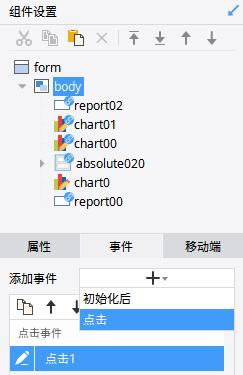
Then click the pencil icon and paste the following code:
var docElm = document.documentElement;
var explorer = window.navigator.userAgent.toLowerCase();
if(explorer.indexOf('chrome') > 0) { //webkit
    if(document.body.scrollHeight === window.screen.height && document.body.scrollWidth === window.screen.width) {
        if(document.exitFullscreen) {
            document.exitFullscreen();
            } else if(document.msExitFullscreen) {
                document.msExitFullscreen();
            } else if(document.mozCancelFullScreen) {
                document.mozCancelFullScreen();
            } else if(document.webkitCancelFullScreen) {
                document.webkitCancelFullScreen();
            }
        }
    else {
        //W3C
        if(docElm.requestFullscreen) {
            docElm.requestFullscreen();
        }
        //FireFox browser
        else if(docElm.mozRequestFullScreen) {
            docElm.mozRequestFullScreen();
        }
        //Chrome and other browsers
        else if(docElm.webkitRequestFullScreen) {
            docElm.webkitRequestFullScreen();
        }
    }
} else { //fireFox browser
    if(window.outerHeight === window.screen.height && window.outerWidth === window.screen.width) {
        if(document.exitFullscreen) {
            document.exitFullscreen();
        } else if(document.msExitFullscreen) {
            document.msExitFullscreen();
        } else if(document.mozCancelFullScreen) {
            document.mozCancelFullScreen();
        } else if(document.webkitCancelFullScreen) {
            document.webkitCancelFullScreen();
        }
    } else {
        //W3C
        if(docElm.requestFullscreen) {
            docElm.requestFullscreen();
        }
        //FireFox browser
        else if(docElm.mozRequestFullScreen) {
            docElm.mozRequestFullScreen();
        }
        //Chrome and other browsers
        else if(docElm.webkitRequestFullScreen) {
            docElm.webkitRequestFullScreen();
        }
    }
}
After I finished, the requirement was changed to: only single-click to enter fullscreen, and do not allow clicking to exit fullscreen to avoid accidental touches.
After reading the code, I changed the exit-fullscreen part under if (document.body.scrollHeight === window.screen.height && document.body.scrollWidth === window.screen.width) to console.log("FullScreen"), and the requirement was solved. The modified part is shown below:
var docElm = document.documentElement;
var explorer = window.navigator.userAgent.toLowerCase();
if (explorer.indexOf('chrome') > 0) { //webkit
	if (document.body.scrollHeight === window.screen.height && document.body.scrollWidth === window.screen.width) {
	console.log("FullScreen")
	} else { //fireFox browser
    if(window.outerHeight === window.screen.height && window.outerWidth === window.screen.width) {
        console.log("FullScreen")
}Unless otherwise stated, all articles on this blog are licensed underCC BY-NC-SA 4.0license. The author reserves all rights. Please credit the source if you wish to reprint.